AI Agent 开发前置知识:模型对话、工具调用与上下文管理

导读 — 本文介绍 AI 应用基础的知识——大模型 API 交互基础。本文内容基于 OpenAI-compatible Chat API 的请求与返回格式展开——OpenAI 请求规范是目前业界最通用的 API 格式,几乎所有主流模型都兼容此协议。

你将看到:

  1. 基础对话:system、user、assistant、tool 消息如何组成上下文。

  2. 工具调用:模型如何通过 tool_calls 请求应用端执行函数。

  3. Reasoning / Thinking:思考模型如何与工具调用配合。

  4. Tools、MCP、Skills:Agent 能力通常如何注入到模型上下文中。

  5. Prompt Caching:上下文如何影响缓存命中。

ps:本文采用 Chat Completions API/v1/chat/completions),是目前最广泛使用的版本。OpenAI 后续推出了 Responses API/v1/responses),两者核心逻辑相同,不影响阅读。

一、基础对话参数

temperature、top_p 等参数控制的是生成行为,不在本文讨论范围内;本文关注的是模型实际处理的消息内容。

输入

参数 说明
model 模型名称
messages 对话历史:system 设定角色、user 用户输入、assistant 模型回复、tool 工具结果
tools 工具定义
tool_choice 工具调用策略:auto 模型自行决定、none 禁用工具、required 必须调用工具、{"type":"function","function":{"name":"xxx"}} 强制调用指定工具

输出

字段 说明
message.content 文字回复
message.tool_calls 工具调用请求
message.reasoning_content 推理过程(仅思考模型),OpenAI 一般不返回此字段,属于其他供应商的扩展字段
finish_reason 结束原因:stop 正常结束、tool_calls 请求调用工具、length 达到 token 上限被截断

基础对话

单轮对话

最简单的请求,只有 modelmessages

1
2
3
4
5
6
{
"model": "mimo-v2.5-pro",
"messages": [
{"role": "user", "content": "用一句话介绍量子计算"}
]
}

响应中包含最终回答 content(推理模型还会额外返回 reasoning_content):

1
2
3
4
5
6
7
8
9
10
{
"choices": [{
"message": {
"role": "assistant", // assistant:角色,表示模型的回复
"reasoning_content": "用户要求用一句话介绍量子计算...", // 推理过程(仅思考模型有此字段)
"content": "量子计算是利用量子叠加和纠缠特性,实现远超传统计算机并行计算能力的新型计算方式。"
},
"finish_reason": "stop" // stop:正常结束,模型输出完毕
}]
}

多轮对话

通过累积 messages 实现多轮对话。每轮请求都要带上完整历史。

1
2
3
4
5
6
7
8
{
"messages": [
{"role": "system", "content": "你是一个厨师"},
{"role": "user", "content": "红烧肉怎么做?"},
{"role": "assistant", "content": "做红烧肉,关键就四个字:肥而不腻。我给你一个家常版、稳定好吃的做法..."},
{"role": "user", "content": "你是谁?"} // 本轮用户提示词
]
}

响应中模型根据上下文知道自己是厨师角色:

1
2
3
4
5
6
7
8
9
10
{
"choices": [{
"message": {
"role": "assistant",
"reasoning_content": "用户问我是谁。根据之前的对话,用户一开始说"你是一个厨师",所以这是一个角色设定。用户现在问我是谁,我应该以厨师的身份回答。",
"content": "哈哈,我是您的**私人厨师**呀!🧑‍🍳\n\n之前您给我安排的角色——**一个厨师**,所以我就系上围裙,随时为您服务!"
},
"finish_reason": "stop"
}]
}

关于历史消息中是否需要携带思考字段的问题

上文的历史消息示例中,我们只保留了 rolecontent。但对于部分思考模型,模型回复中可能还会包含 reasoning_contentreasoningreasoning_details 等思考字段。那么,这些思考字段是否也需要一并写入历史消息呢?

我查阅了相关资料后发现,各家 API 的处理方式并不完全一致:有的场景需要回传思考字段,有的场景不需要;而且不同平台返回的字段名也不相同。例如,DeepSeek 在 thinking mode 中使用 reasoning_content,并明确区分普通对话和工具调用场景:如果本轮只是普通对话,reasoning_content 不需要参与后续上下文拼接;如果本轮发生了工具调用,则需要在后续请求中继续传回该字段。

通用建议是:不要默认把思考字段写入历史消息。普通多轮对话通常只需要保存模型面向用户的最终回答,也就是 content;只有当具体 API 文档明确要求回传思考字段时,才按对应平台的规则处理。

另外,如果模型没有把思考内容拆成单独字段,而是直接把思考链和最终答案一起放在 content 中,例如:

1
2
<think>...</think>
最终回答

那么也建议在写入历史消息前先做拆分:思考内容可以单独记录到日志中用于调试,但历史消息里通常只保留“最终回答”。这样可以避免上下文膨胀、思考链污染后续回复,也更符合多数推理服务的推荐用法。


二、工具调用

Function Calling(函数调用)允许模型决定何时调用工具、调用哪个工具,以及传递什么参数。下面这个图很清晰,图来至菜鸟教程。
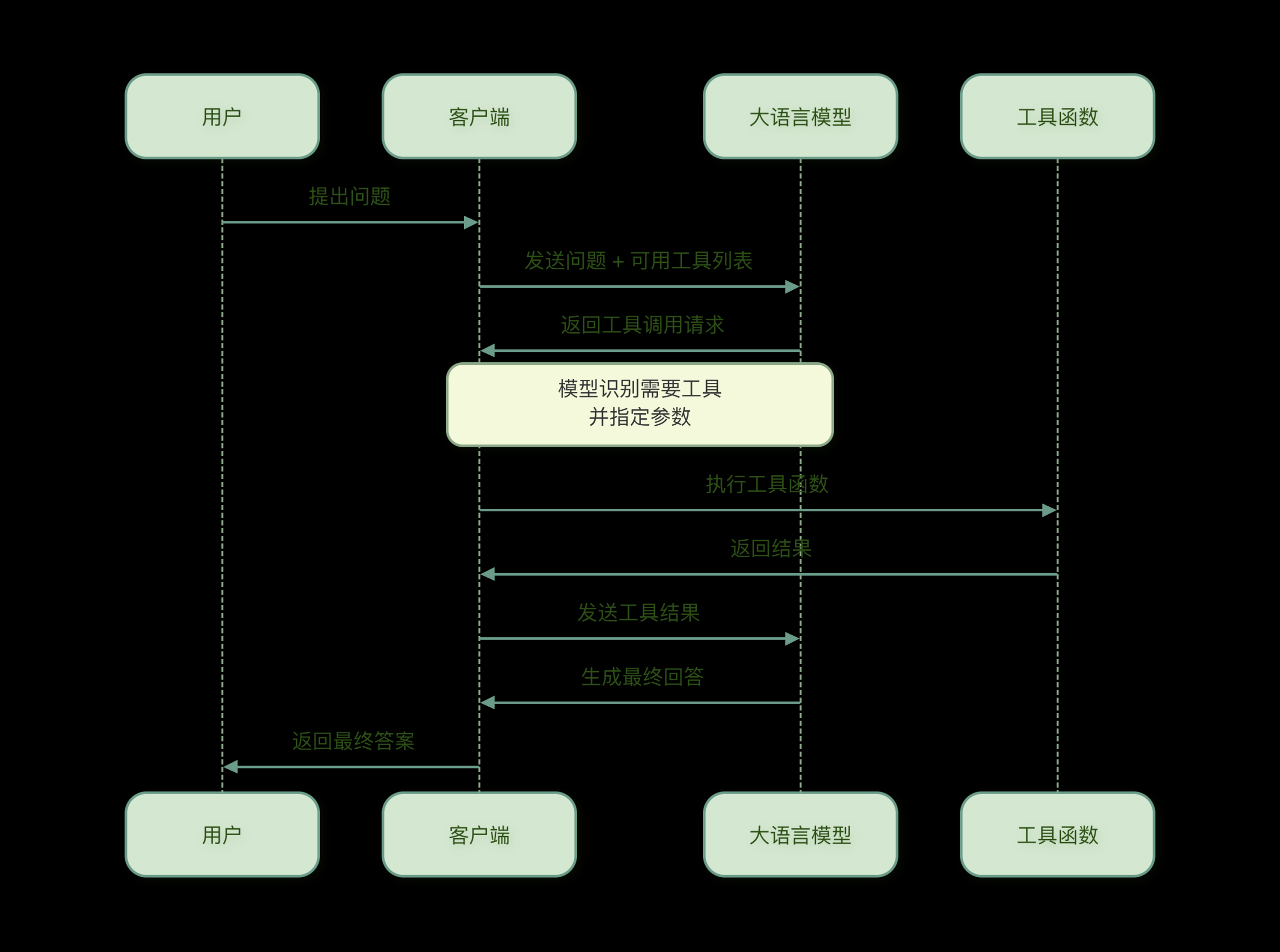
function-calling-flow

输入

在基础对话参数的基础上,新增:

参数 说明
tools 工具定义数组,每个工具包含 namedescriptionparameters
tool_choice 工具调用策略:auto 模型自行决定、none 禁用工具、required 必须调用工具

工具结果通过 role: "tool" 消息回传,塞进 messages 中:

字段 说明
role 固定为 "tool"
tool_call_id 关联模型返回的 tool_calls[].id(ps:无需关注,使用模型返回的工具 id 字段)
content 工具执行结果(字符串)

输出

模型返回的 message 中新增:

字段 说明
tool_calls 工具调用请求数组,每个包含 idfunction.namefunction.arguments
finish_reason tool_calls 时表示模型请求调用工具

工具定义

1
2
3
4
5
6
7
8
9
10
11
12
13
14
15
16
17
18
19
{
"tools": [
{
"type": "function", // 工具类型,目前只有 function(OpenAI Responses规范类似更多)
"function": {
"name": "get_weather", // 函数名,模型通过此名称调用
"description": "查询城市当前天气", // 函数描述,模型根据描述决定是否调用
"parameters": { // 参数定义,使用 JSON Schema 格式
"type": "object",
"properties": {
"city": {"type": "string"} // 参数名和类型
},
"required": ["city"] // 必填参数
}
}
}
],
"tool_choice": "auto" // 调用策略:auto / none / required
}

完整示例

以”去北京旅游,先查天气,天气好再查空气质量”为例,展示多轮工具调用的完整流程。

先思考 → 先调用天气工具 → 根据天气结果继续思考 → 再决定是否调用空气质量工具 → 再基于工具结果最终回答

第一轮:发送用户消息

请求:

1
2
3
4
5
6
7
8
{
"model": "mimo-v2.5-pro",
"tools": [/* get_weather、get_fx_rate、get_air_quality 三个工具的定义*/],
"messages": [
{"role": "user", "content": "我想去北京旅游,先帮我查一下天气,如果天气不错再查一下空气质量。"}
],
"tool_choice": "auto"
}

响应(模型先查天气):

1
2
3
4
5
6
7
8
9
10
11
12
13
14
15
16
17
18
19
20
{
"choices": [{
"message": {
"role": "assistant",
"content": "", // 为空,模型选择用工具回答
"reasoning_content": "用户想去北京旅游,想先查天气,如果天气好再查空气质量。我需要先调用天气查询函数。", // 推理过程
"tool_calls": [
{
"id": "call_xxx", // 工具调用 id,回传结果时需要关联
"type": "function",
"function": {
"name": "get_weather", // 要调用的函数名
"arguments": "{\"city\": \"北京\"}" // 函数参数(JSON 字符串)
}
}
]
},
"finish_reason": "tool_calls" // 表示模型请求调用工具
}]
}

第二轮:天气不错,继续查空气质量

请求(追加第一轮的 assistant 消息和天气工具结果):

1
2
3
4
5
6
7
8
9
10
11
12
13
14
15
16
17
18
19
{
"messages": [
{
"role": "user",
"content": "我想去北京旅游,先帮我查一下天气,如果天气不错再查一下空气质量。"
},
{
"role": "assistant",
"content": "",
"tool_calls": [/* 同第一轮响应 */]
// 不回传 reasoning_content,有利于缓存命中(见缓存章节)
},
{
"role": "tool",
"tool_call_id": "call_xxx",
"content": "{\"city\": \"北京\", \"temperature\": \"22°C\", \"condition\": \"晴\", \"humidity\": \"45%\"}"
}
]
}

响应(模型根据天气结果,决定继续查空气质量):

1
2
3
4
5
6
7
8
9
10
11
12
13
14
15
16
17
18
19
20
{
"choices": [{
"message": {
"role": "assistant",
"content": "", // 仍然为空,模型决定继续调用工具
"reasoning_content": "天气看起来不错,温度22度,晴朗,湿度45%。接下来应该查询空气质量。", // 根据天气结果决定下一步
"tool_calls": [
{
"id": "call_yyy",
"type": "function",
"function": {
"name": "get_air_quality", // 天气好,继续查空气质量
"arguments": "{\"city\": \"北京\"}"
}
}
]
},
"finish_reason": "tool_calls" // 仍然是 tool_calls,表示还需要一轮
}]
}

第三轮:生成最终回答

请求(追加第二轮的 assistant 消息和空气质量工具结果):

1
2
3
4
5
6
7
8
9
10
11
12
13
14
15
16
17
18
19
20
21
22
23
24
25
26
27
28
29
30
{
"messages": [
{
"role": "user",
"content": "我想去北京旅游,先帮我查一下天气,如果天气不错再查一下空气质量。"
},
{
"role": "assistant",
"content": "",
"tool_calls": [/* 第一轮工具调用 */]
// 不回传 reasoning_content
},
{
"role": "tool",
"tool_call_id": "call_xxx",
"content": "{\"city\": \"北京\", \"temperature\": \"22°C\", \"condition\": \"晴\", \"humidity\": \"45%\"}"
},
{
"role": "assistant",
"content": "",
"tool_calls": [/* 第二轮工具调用 */]
// 不回传 reasoning_content
},
{
"role": "tool",
"tool_call_id": "call_yyy",
"content": "{\"city\": \"北京\", \"aqi\": 35, \"level\": \"优\", \"pm25\": 12}"
}
]
}

响应(模型根据所有结果生成最终回答):

1
2
3
4
5
6
7
8
9
10
{
"choices": [{
"message": {
"role": "assistant",
"reasoning_content": "天气和空气质量都很不错。现在可以给用户一个完整的建议。", // 所有数据齐全,准备生成回答
"content": "北京现在天气非常不错!温度22°C,晴天,湿度45%,空气质量优(AQI 35),非常适合出行!" // 最终回答
},
"finish_reason": "stop" // 正常结束
}]
}

三、思考中调工具

「在思考中使用工具」这一能力在2025年因 DeepSeekMiniMax 等模型的支持而广受关注过。具体是什么意思?请看下面。

Claude Code 为例,其执行流程为:思考 → 工具调用 → 再思考 → 输出回答。可以看到,工具调用穿插在两次思考之间——这是大模型「在思考中使用工具」的体现。
在上一章节第二轮的响应中也可以看到,reasoning_contenttool_calls 有值,但 content 为空——模型已完成思考并输出了工具调用请求,但尚未给出最终回答,需等待工具返回结果后再继续推理。
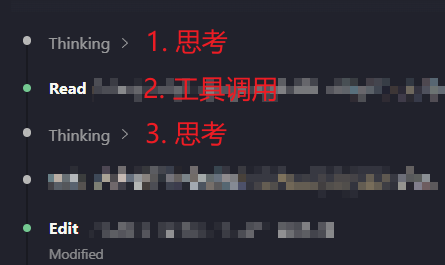
claude-code-thinking-tool-calling

部分支持 thinking / reasoning 模式的模型或 API,允许在生成最终答案之前穿插工具调用。典型流程如下:

1
2
3
4
5
6
7
8
9
用户请求
→ 模型开始 reasoning
→ 模型判断需要外部工具
→ API 返回 reasoning 信息 + tool_calls,通常 content 为空
→ 外部程序执行工具
→ 将工具结果作为 role: "tool" 消息回传
→ 模型基于工具结果继续 reasoning
→ 必要时继续调用工具
→ 最终输出 content

此时 API 响应通常具有以下特征:

1
2
3
4
reasoning_content / reasoning 有值:API 暴露的 reasoning 信息,字段名因供应商而异
tool_calls 有数据:模型请求调用的工具
content 为空或无最终答案:模型尚未完成最终回复
finish_reason 为 tool_calls:表示当前轮需要外部执行工具

与普通工具调用相比,两者的主要区别如下:

模式 流程 特点
普通 tool calling 用户请求 → 模型返回 tool_calls → 外部执行工具 → 回传 role:"tool" → 模型继续或最终回答 通常不暴露思考字段,也不需要回传思考字段
thinking / reasoning tool calling 用户请求 → 模型 reasoning → 返回 reasoning 信息 + tool_calls → 外部执行工具 → 回传工具结果 → 模型继续 reasoning → 最终回答 会暴露 reasoning 字段;是否需要回传该字段取决于具体 API

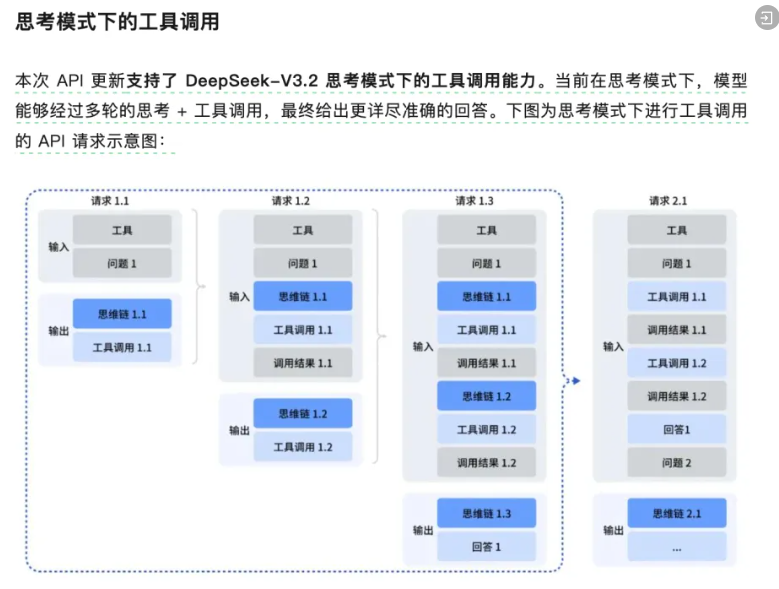
附上DeepSeek正确的一张示意图:

deepseek-thinking-mode-diagram

一篇更详细的博文:https://news.qq.com/rain/a/20251204A05XL800

四、Agent 中的 Tools、MCP、Skills

Agent 场景下,常见的能力注入方式可以简单分成三类:Tools、MCP、Skills。它们的目标都是增强模型能力,但方式不一样。

类型 可以理解成 常见载体 说明
工具(Tools) 直接给模型一组“可调用函数” tools 字段 模型通过 tool_calls 请求调用,真正执行由应用端完成
MCP 外接工具的统一接口 tools 字段 转成普通工具,和内置工具走同一条链路
Skills(技能) 按需加载的“说明书/操作手册” system prompt 以文本形式注入,模型用 read 工具读取执行

工具(Tools)

Tools 就是最直接的函数调用。开发者在请求里通过 tools 字段告诉模型有哪些函数可以用,例如查天气、查汇率、查数据库。模型不会自己执行函数,而是返回 tool_calls,由应用端执行后再把结果回传给模型。OpenAI 官方 Function Calling 文档也把这个流程描述为:发送工具定义、模型返回 tool call、应用执行工具、把工具结果回传、模型继续回答。

MCP 工具

MCP 可以理解成”给 Agent 接外部能力的标准插座”。普通 Tools 通常是你在代码里直接定义的函数,而 MCP 工具可能来自一个外部 MCP Server,比如文件系统、GitHub、数据库、浏览器、企业系统等。

对模型来说,MCP 工具和普通工具没有区别;对应用端来说,背后多了一层 MCP Client/Server 的转发。

Skills(技能)

Skills 更像是“操作手册”或“技能包”,不是一个马上执行的函数。它通常包含一个 SKILL.md 文件,里面写着什么时候使用这个技能、具体怎么做、有哪些注意事项,也可能带脚本、模板、参考资料等文件。

openclaw 这类实现里,系统会先把可用 skill 的名字、描述、路径注入到 system prompt 里。模型先根据描述判断是否需要某个 skill;如果需要,再用 read 工具读取对应路径下的 SKILL.md。也就是说,skill 本身不是一个函数调用,而是让模型按需加载一份更详细的说明书。

Anthropic 对 Agent Skills 的介绍也强调了类似思路:Skills 通过”渐进披露”工作,先让模型看到少量信息,只有相关时才加载 SKILL.md 和附加文件,避免一开始把所有内容都塞进上下文。

以下基于 openclaw 源码举例,Agent实际是如何加载skill的

system prompt 中的 Skills 指令

openclawbuildSkillsSection 函数会生成如下指令(参考 src/agents/system-prompt.ts):

1
2
3
4
5
6
## Skills (mandatory)
Before replying: scan <available_skills> <description> entries.
- If exactly one skill clearly applies: read its SKILL.md at <location> with read tool, then follow it.
- If multiple could apply: choose the most specific one, then read/follow it.
- If none clearly apply: do not read any SKILL.md.
Constraints: never read more than one skill up front; only read after selecting.

这段指令明确告诉模型:匹配到 skill 后,用 read 工具读取 <location> 路径的 SKILL.md 文件。

技能目录格式

技能列表以 XML 格式注入 system prompt(参考 src/agents/skills/workspace.ts):

1
2
3
4
5
6
7
8
9
10
11
12
<available_skills>
<skill>
<name>checks</name>
<description>Run checks before landing changes.</description>
<location>/skills/checks/SKILL.md</location>
</skill>
<skill>
<name>release</name>
<description>Release OpenClaw safely.</description>
<location>/skills/release/SKILL.md</location>
</skill>
</available_skills>

每个 skill 包含三个字段:

字段 作用
<name> 标识 skill
<description> 让模型判断是否匹配用户请求
<location> 告诉模型去哪里读 SKILL.md
工具 vs Skills
工具(Tools) Skills
注册方式 tools 字段 system prompt
模型如何调用 返回 tool_calls 调用 read 工具读取 SKILL.md
执行方式 应用端执行函数 模型按 SKILL.md 指令操作
选择方式 模型直接选工具名 模型匹配描述,再读文件

Skills 的本质是结构化的提示词工程,把领域知识存成文件,按需加载到上下文中,让模型用现有工具(如 readbash)去执行。

再拿 Claude Code 的 Skills 格式举例

Claude Code 同样把 Skills 注入 system prompt,但用 XML 标签包裹 + 纯文本列表的形式:

1
2
3
4
5
6
7
<system-reminder>
The following skills are available for use with the Skill tool:

- update-config: Use this skill to configure the Claude Code harness via settings.json. TRIGGER when: ... SKIP when: ...
- simplify: Review changed code for reuse, quality, and efficiency, then fix any issues found.
- loop: Run a prompt or slash command on a recurring interval.
</system-reminder>

每个 skill 用 - name: 描述 的纯文本格式,没有嵌套 XML 标签。

两者都用 XML 做结构分隔,内部格式不同,核心思路一致:skill 信息以文本形式注入 system prompt,模型根据描述决定是否使用。

总结:

类型 注册方式 模型感知
工具(Tools) 定义在请求的 tools 字段中 模型决定调用哪个工具、传什么参数,由应用端执行后回传结果
MCP 工具 发送前转换为标准工具格式,走 tools 字段 对模型来说与普通工具无区别
Skills(技能) 注入到 system prompt 中,不注册为工具 模型根据 prompt 中的描述决定是否使用

五、 缓存

OpenAIPrompt Caching 可以简单理解为:如果多次请求开头的 prompt 内容完全一样,OpenAI 可以复用之前已经计算过的前缀,从而降低延迟和成本。

参与缓存的字段

字段 说明
messages 必须从头完全一致,顺序不能变
model 模型名
tools 工具定义
tool_choice 工具策略
temperature / top_p 静态参数

不参与缓存的: user 等 metadata 字段。

前缀匹配机制

缓存匹配的是最终 prompt token 的最长相同前缀。例如:

1
2
3
4
请求1: [system, tools, user A, assistant, user B]
请求2: [system, tools, user A, assistant, user C]
↑ 前面这些内容完全一致,可能命中缓存
↑ 从这里开始不同,需要重新计算

所以想提高缓存命中率,关键是让请求开头尽量稳定:

1
2
3
4
5
6
7
8
9
10
11
12
13
稳定放前面:
system prompt
工具定义 tools
固定规则
固定示例
结构化输出 schema

变化放后面:
当前用户问题
时间
用户个性化信息
检索结果
临时状态

回传思考字段对缓存的影响

前文提到,不同模型/API 对思考字段的处理规则不同:有些模型在工具调用场景下要求回传 reasoning_content,有些模型则不要求回传。因此,我们用小米的 mimo-v2.5-pro 做了一个对比实验,场景沿用第二章中的“先查天气,天气不错再查空气质量”。

以下是回传与不回传 reasoning_contenttoken 数据对比:

不回传 回传
第一轮 prompt 686 686
cached 640 640
缓存率 93.3% 93.3%
第二轮 prompt 748 809 (+61)
cached 704 640
缓存率 94.1% 79.1%
第三轮 prompt 812 916 (+104)
cached 768 768
缓存率 94.6% 83.8%

关键差异在第二轮

  • 不回传时 cached=704,回传时 cached=640,少了 64 tokens
  • 原因:回传的 reasoning_content 文本改变了 assistant 消息的内容,与第一轮缓存的前缀不匹配,导致这部分无法复用
  • 不回传时 assistant 消息(只有 content + tool_calls)和第一轮响应一致,前缀匹配更长

这说明,在当前实验中,回传 reasoning_content 不仅增加了输入长度,还让可复用的缓存前缀变短了。原因是缓存通常依赖精确前缀匹配:如果在历史消息中插入一段新的 reasoning_content,最终 prompt token 序列会在更早的位置与之前请求发生分叉,导致后续部分无法复用缓存。

因此,对于当前测试的 mimo-v2.5-pro 来说,reasoning_content 不适合写入历史消息。

不过,这个结论不能直接推广到所有模型。比如 DeepSeek 官方 thinking mode 明确要求:如果某一轮发生了 tool call,该轮 assistant 的 reasoning_content 必须在后续请求中完整传回,否则可能报错。

结论:

在当前 mimo-v2.5-pro 实验中,不回传 reasoning_content 的效果更好:prompt 更短,缓存命中率更高。

所以,除非 API 明确要求回传思考字段,否则一般不建议默认把 reasoning_content 写入历史消息。

本文的样例代码为PythonOpenAI 提供了Python下的请求包,下载pip install openai,本文没有介绍此包的用法,而是重点围绕 AI 应用设计/开发所需的模型交互知识。微信公众号读者请点击跳转原文,在文章最后附上测试代码。

六、测试代码

(一)基础对话

1
2
3
4
5
6
7
8
9
10
11
12
13
14
15
16
17
18
19
20
21
22
23
24
25
26
27
28
29
30
31
32
33
34
35
36
37
38
39
40
41
42
43
44
45
46
47
48
49
50
51
52
53
54
55
56
57
58
59
60
61
62
63
64
65
66
67
68
69
70
71
72
73
74
75
76
77
78
79
80
81
82
83
84
85
86
87
88
89
90
91
92
93
94
95
96
97
98
99
100
101
102
103
104
105
106
107
108
109
110
111
import os
import sys
import json
from openai import OpenAI

sys.stdout.reconfigure(encoding="utf-8")

client = OpenAI(
base_url="https://token-plan-cn.xiaomimimo.com/v1", // API 地址
api_key=os.environ.get("OPENAI_API_KEY", "你的key")
)
model = "mimo-v2.5-pro"


def dump_request(label, **kwargs):
print(f"\n{'=' * 50}")
print(f"[请求] {label}")
print(f"{'=' * 50}")
print(json.dumps(kwargs, ensure_ascii=False, indent=2, default=str))


def dump_response(label, response):
print(f"\n{'=' * 50}")
print(f"[响应] {label}")
print(f"{'=' * 50}")
print(f"Model: {response.model}")
print(f"Finish reason: {response.choices[0].finish_reason}")
message = response.choices[0].message
print(f"Reasoning: {message.reasoning_content}")
if message.content:
print(f"Content: {message.content}")


# ========================================
# 测试 1:单轮纯文本对话
# ========================================
print("\n" + "#" * 60)
print("# 测试 1:单轮纯文本对话")
print("#" * 60)

messages1 = [
{"role": "user", "content": "用一句话介绍量子计算"}
]

request1 = dict(model=model, messages=messages1)
dump_request("单轮对话", **request1)

response1 = client.chat.completions.create(**request1)
dump_response("单轮对话", response1)


# ========================================
# 测试 2:多轮对话(带角色设定)
# ========================================
print("\n" + "#" * 60)
print("# 测试 2:多轮对话(带角色设定)")
print("#" * 60)

messages2 = [
{"role": "system", "content": "你是一个厨师"},
]

# 第一轮
messages2.append({"role": "user", "content": "红烧肉怎么做?"})

request2 = dict(model=model, messages=messages2)
dump_request("第一轮", **request2)

response2 = client.chat.completions.create(**request2)
dump_response("第一轮", response2)

# 第二轮:验证角色是否保持
messages2.append(response2.choices[0].message.model_dump(exclude_none=True))
messages2.append({"role": "user", "content": "你是谁?"})

request2b = dict(model=model, messages=messages2)
dump_request("第二轮:验证角色", **request2b)

response2b = client.chat.completions.create(**request2b)
dump_response("第二轮:验证角色", response2b)


# ========================================
# 测试 3:系统提示词对比
# ========================================
print("\n" + "#" * 60)
print("# 测试 3:系统提示词对比")
print("#" * 60)

question = "介绍一下你自己"

# 无 system
messages3a = [
{"role": "user", "content": question}
]
request3a = dict(model=model, messages=messages3a)
dump_request("无 system", **request3a)
response3a = client.chat.completions.create(**request3a)
dump_response("无 system", response3a)

# 有 system
messages3b = [
{"role": "system", "content": "你是一个海盗船长,说话要带海盗口吻。"},
{"role": "user", "content": question}
]
request3b = dict(model=model, messages=messages3b)
dump_request("有 system(海盗船长)", **request3b)
response3b = client.chat.completions.create(**request3b)
dump_response("有 system(海盗船长)", response3b)

(二)工具调用

1
2
3
4
5
6
7
8
9
10
11
12
13
14
15
16
17
18
19
20
21
22
23
24
25
26
27
28
29
30
31
32
33
34
35
36
37
38
39
40
41
42
43
44
45
46
47
48
49
50
51
52
53
54
55
56
57
58
59
60
61
62
63
64
65
66
67
68
69
70
71
72
73
74
75
76
77
78
79
80
81
82
83
84
85
86
87
88
89
90
91
92
93
94
95
96
97
98
99
100
101
102
103
104
105
106
107
108
109
110
111
112
113
114
115
116
117
118
119
120
121
122
123
124
125
126
127
128
129
130
131
132
133
134
135
136
137
138
139
140
141
142
143
144
145
146
147
148
149
150
151
152
153
154
155
156
157
158
159
160
161
162
163
164
165
166
167
168
169
170
171
172
173
174
175
176
177
178
179
180
181
182
import os
import sys
import json
from openai import OpenAI


client = OpenAI(
base_url="https://token-plan-cn.xiaomimimo.com/v1",
api_key=os.environ.get("OPENAI_API_KEY", "你的key")
)
model="mimo-v2.5-pro"

sys.stdout.reconfigure(encoding="utf-8")


def dump_request(label, **kwargs):
print(f"\n{'=' * 50}")
print(f"[请求] {label}")
print(f"{'=' * 50}")
print(json.dumps(kwargs, ensure_ascii=False, indent=2, default=str))


def dump_response(label, response):
print(f"\n{'=' * 50}")
print(f"[响应] {label}")
print(f"{'=' * 50}")
message = response.choices[0].message
print(f"Finish reason: {response.choices[0].finish_reason}")
if hasattr(message, 'reasoning_content') and message.reasoning_content:
print(f"Reasoning: {message.reasoning_content}")
if message.content:
print(f"Content: {message.content}")
if message.tool_calls:
print(f"Tool calls: {json.dumps([tc.model_dump() for tc in message.tool_calls], ensure_ascii=False, indent=2)}")
# 打印 token 消耗
if response.usage:
u = response.usage
print(f"Usage: prompt={u.prompt_tokens}, completion={u.completion_tokens}, total={u.total_tokens}")
if hasattr(u, 'prompt_tokens_details') and u.prompt_tokens_details:
d = u.prompt_tokens_details
print(f" cached_tokens={getattr(d, 'cached_tokens', 'N/A')}")


# --- 模拟工具函数 ---
def get_weather(city: str) -> dict:
return {"city": city, "temperature": "22°C", "condition": "晴", "humidity": "45%"}


def get_fx_rate(**kwargs) -> dict:
return {"from": kwargs["from"], "to": kwargs["to"], "rate": 7.24}


def get_air_quality(city: str) -> dict:
return {"city": city, "aqi": 35, "level": "优", "pm25": 12}


TOOL_MAP = {
"get_weather": lambda **kw: get_weather(kw["city"]),
"get_fx_rate": get_fx_rate,
"get_air_quality": lambda **kw: get_air_quality(kw["city"]),
}

# --- 工具定义 ---
tools = [
{
"type": "function",
"function": {
"name": "get_weather",
"description": "查询城市当前天气",
"parameters": {
"type": "object",
"properties": {
"city": {"type": "string"}
},
"required": ["city"],
"additionalProperties": False,
},
"strict": True,
},
},
{
"type": "function",
"function": {
"name": "get_fx_rate",
"description": "查询两种货币的汇率",
"parameters": {
"type": "object",
"properties": {
"from": {"type": "string"},
"to": {"type": "string"},
},
"required": ["from", "to"],
"additionalProperties": False,
},
"strict": True,
},
},
{
"type": "function",
"function": {
"name": "get_air_quality",
"description": "查询城市空气质量",
"parameters": {
"type": "object",
"properties": {
"city": {"type": "string"},
},
"required": ["city"],
"additionalProperties": False,
},
"strict": True,
},
},
]

# --- 第一轮:发送用户消息 ---
messages = [
{"role": "user", "content": "我想去北京旅游,先帮我查一下天气,如果天气不错再查一下空气质量。"}
]

request1 = dict(model=model, tools=tools, messages=messages, tool_choice="auto")
dump_request("第一轮:发送用户消息", **request1)

response = client.chat.completions.create(**request1)
dump_response("第一轮:模型请求调用工具", response)

message = response.choices[0].message

# --- 第二轮:将工具调用结果返回给模型 ---
if message.tool_calls:
# 把 assistant 的 tool_calls 消息加入对话历史(不回传 reasoning_content)
assistant_msg = message.model_dump(exclude_none=True)
assistant_msg.pop("reasoning_content", None)
messages.append(assistant_msg)

for tc in message.tool_calls:
func_name = tc.function.name
func_args = json.loads(tc.function.arguments)

# 执行对应的模拟函数
result = TOOL_MAP[func_name](**func_args)

# 把工具执行结果加入对话历史
messages.append({
"role": "tool",
"tool_call_id": tc.id,
"content": json.dumps(result, ensure_ascii=False),
})

request2 = dict(model=model, tools=tools, messages=messages, tool_choice="auto")
dump_request("第二轮:将工具结果返回给模型", **request2)

response2 = client.chat.completions.create(**request2)
dump_response("第二轮:模型基于工具结果回答", response2)

message2 = response2.choices[0].message

# --- 第三轮:如果模型再次请求调用工具 ---
if message2.tool_calls:
assistant_msg2 = message2.model_dump(exclude_none=True)
assistant_msg2.pop("reasoning_content", None) # 不回传 reasoning_content
messages.append(assistant_msg2)

for tc in message2.tool_calls:
func_name = tc.function.name
func_args = json.loads(tc.function.arguments)
result = TOOL_MAP[func_name](**func_args)

messages.append({
"role": "tool",
"tool_call_id": tc.id,
"content": json.dumps(result, ensure_ascii=False),
})

request3 = dict(model=model, tools=tools, messages=messages, tool_choice="auto")
dump_request("第三轮:将工具结果返回给模型", **request3)

response3 = client.chat.completions.create(**request3)
dump_response("第三轮:模型最终回答", response3)


本站总访问量 10000
本站总访客数 500
本页总访客数 加载中...
发表了 41 篇文章 🔸 总计 128.3k 字